Practical Guides
Choose the customer moment before you choose the review request
A practical plan for keeping delivery confirmation, purchase thank-you benefits and general customer campaigns clear, useful and measurable.
By Mister Ripple ·
Interactive tools load with JavaScript. The article text and source links are available below.
Key takeaways
- Choose the link for the customer action you actually want, not just the email subject line.
- An order, a form submission, a delivery confirmation and a public review are different evidence.
- A review opportunity, optional support contact and marketing permission remain independent.
Give the message one clear job
A shipping update, a product care guide and an invitation to share feedback can reach the same person. They still have different jobs. A customer trying to find a missing parcel should not have to work through a promotional form. Someone opening a care guide should receive that guide without having to complete a public review.
Before choosing a template, finish this sentence: after opening this message, the customer should be able to do one useful thing. Confirm a delivery. Get a relevant resource. Share an experience. Then choose the destination that performs that job.
This playbook is an operating method, not a promise about the best day or hour to send. Start with the event you can actually observe and the amount of experience the customer needs before the request makes sense.
Choose from three different starting points
Known purchaser context comes from a real order or an established purchase record. It does not come from an email address alone. A general campaign without purchase evidence should not present the person as a buyer.
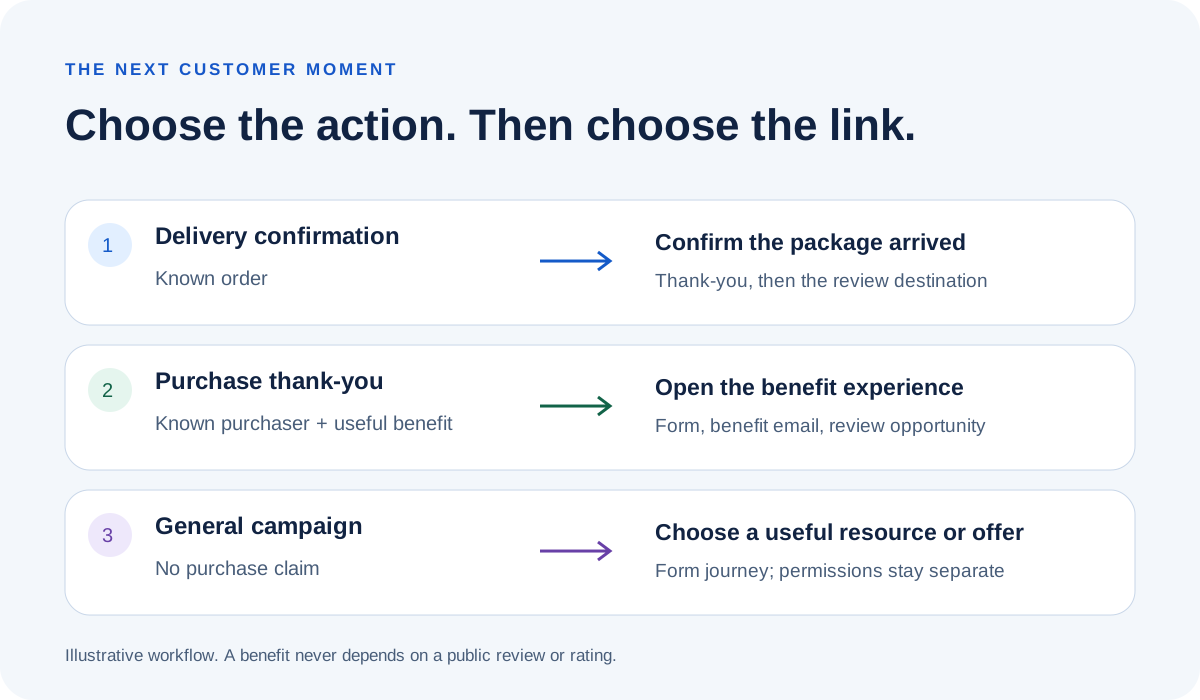
Ripple supports a short delivery-confirmation path and the usual campaign form journey. A purchase thank-you benefit uses known purchaser context but still follows the form-and-benefit journey. A general benefit campaign can use that same form journey without claiming there was a purchase.
| Starting point | Customer action | What the Ripple path does |
|---|---|---|
| Order-triggered delivery email | Confirm package arrived | Branded thank-you and automatic review routing; no campaign form or new benefit. |
| Purchase thank-you with a useful benefit | Open the relevant benefit experience | Campaign form, benefit emailed during the brief thank-you, then automatic review routing. |
| General campaign without a purchase | Choose to access a useful resource or offer | Campaign form and benefit journey; do not label the interaction a verified purchase. |
Make the missing-package route easy to find
Use the delivery shortcut in an order-triggered message for an existing purchaser. Put a separate missing-package support link in the same email. The shortcut is an affirmative delivery interaction, not a tool for diagnosing or resolving a delivery problem.
For example, a message can offer Confirm package arrived and Get help with this delivery as distinct actions. The support destination should be one the business actually monitors. Do not promise live chat, a replacement or an immediate resolution unless that operation exists.
The delivery route uses the campaign's configured priority order or pinned review destination. A click does not demonstrate that a public review was posted, and this shortcut does not collect the identity needed for repeat-customer routing through the usual form.
- Copy the delivery-specific link from the campaign, not a generic website address.
- Check the selected platform and exact location or product before sending.
- Keep support available without asking for a positive rating.
An example with two useful moments
Fictional example: a cookware shop already has an order record for a customer. Its first message addresses delivery. After the customer has had a reasonable opportunity to use the item, a separate message offers its genuine care guide. This is an example plan, not a customer result or a fixed schedule recommendation.
Delivery message: Your order update is ready. If the package has arrived, you can confirm it here. If it has not arrived or you need help, contact our delivery support team. The confirmation button uses the delivery shortcut; the help button uses the business's existing support page.
Care-guide message: Here is a useful next step for your new cookware. Open the care-guide experience to get the guide. You can also share honest feedback. The guide is not a reward for leaving a review. The business must actually have a guide to provide and use the usual benefit form path.
Neither message claims that an external platform will award a verified-purchase badge. A purchase record helps the business understand the interaction; the destination platform applies its own verification rules.
Name the sender and the evidence owner
When a business adds Ripple links to an existing Klaviyo or Mailchimp workflow, that email platform controls those outbound messages and their timing. Ripple provides the linked customer journey. That does not mean Ripple sends no emails: in the configured benefit form journey, Ripple emails the benefit during the brief thank-you confirmation.
Write down which system sends the initial message, which system records its click, and which system owns the resulting registration or delivery-confirmation event. Do not configure a reminder around an event the email platform has never received.
Mailchimp documents purchase-activity triggers for connected commerce setups and distinguishes transaction-related messages from marketing. Check the connected store, the available event and the customer's permissions in the actual account. This page does not install an integration or certify a message's legal classification.
Sources: Mailchimp: transactional and marketing email; Mailchimp: purchase activity triggers
Keep the four events separate
An email click says that a link was used. A delivery confirmation says that the delivery interaction was recorded. A campaign submission says that a form was completed. A public review is a separate event on the destination platform. Do not rename one event as another to make the campaign look successful.
Before adding any reminder, inspect the signals your sender actually has. If it records only clicks, describe the reminder as based on click activity. Do not claim that the business knows someone has not left an external review unless a supported, correctly matched source establishes that fact.
Use a small pilot with an explicit audience, purchase or campaign context, named support owner and a review date. Record the message sent, the destination, the observable action and the business follow-up. Choose a next change because the evidence points to it, not because a generic five-day sequence looks tidy.
A launch card your team can use
Google permits review requests through its business review link and QR code, and prohibits incentives for posting or changing reviews. It also prohibits selectively soliciting positive reviews. A benefit being separate from the review does not by itself guarantee that a particular campaign meets every destination's rules.
Keep the public review opportunity available at every rating. Optional issue details and permission to contact the customer are separate from marketing consent. Receiving a guide, entering contact details or confirming a delivery should not silently add a new marketing permission.
- State whether this is an order-triggered message, a purchase thank-you or a general campaign.
- Choose the delivery shortcut or the usual benefit form deliberately.
- Verify the destination and the support contact on a phone.
- Check the benefit exists and is delivered independently of any public review or rating.
- Name the system that sends each message and the event it can actually observe.
- Keep support contact and marketing choices separate.
- Use an isolated test before customer sends; verify side effects instead of assuming they are harmless.
- Measure clicks, confirmations, form submissions and observed reviews separately.
Sources: Google: review request links and incentives; Google: prohibited and restricted content
Start with the flow you already have
Use the post-purchase setup guide to check the campaign link and the customer action before changing your email sequence. Choose one useful moment, connect it to the right existing Ripple flow, and keep its measurement honest. The next improvement can then follow a real customer need.